
Workspaces a product ships
This is a guide, not the contract. What the platform guarantees is specified under
openspec/specs/. For this page:workspaces. Where this page and a specification disagree, the specification is right, and that is a defect in this page: change the behaviour there, then explain it here.
A distribution ships workspaces with provideWorkspaces. This page covers how one is declared, how a
rail item offers it, which content it claims, what happens when a shipped workspace can no longer
work as declared, and how saved workspaces are told apart.
Developer-defined workspaces
A distribution can ship ready-made workspaces next to the user’s own with provideWorkspaces.
They are switchable and self-remembering like any workspace and resettable to their declaration, but
their baseline lives in code, so the user cannot overwrite, rename or delete them. Because they behave
differently, the workspace dialog keeps them in their own list, beside the user’s: it opens on
whichever list holds the active workspace, and each label carries its count, so a visitor who has
saved nothing yet still sees that the product ships some. A distribution that ships none never sees the
switch. Invalid declarations are reported to the console in dev mode, naming what is
ignored; nothing fails silently at runtime.
There is always exactly one active workspace. A fresh installation starts in the built-in
Default workspace, or in the one you declare initial (below). Everything the user rearranges
belongs to the workspace they are standing in. Named workspaces (shell.workspace.manage) are self-remembering: switching restores each
workspace’s own live arrangement exactly, without asking and without discarding anything. Each
workspace also has a baseline. For a user-saved workspace that is the explicitly saved snapshot:
“Save as new” captures the current arrangement and switches to it, and “Save workspace” updates the
active one’s baseline. Putting a workspace back to its baseline is
Resetting the arrangement. Neither a switch nor a reset carries the content the user
was looking at into the arrangement it restores: the workspace shows what it held.
// src/app/app.config.ts — in the providers arrayimport { provideWorkspaces } from '@loomweaver/shell';
provideWorkspaces({  id: 'acme.review',  title: 'product.workspace.review', // a Transloco key (or a literal — unknown keys render as-is)  icon: 'workspaces',  sidebars: { 'left-panel': ['acme.nav'] }, // visible views per panel region; {} hides every sidebar  content: {    columns: [      { size: 35, tabs: [{ path: 'entry/e-01', closable: false }] },      { rows: [{ size: 60, tabs: ['search'] }, { tabs: ['notes'] }] },    ],  },});
Each declaration is a WorkspaceDefinition. Its content is a WorkspaceArea: exactly one
of tabs (a WorkspaceTabArea, holding the pane’s tabs), rows (a WorkspaceRowArea,
panes stacked top-to-bottom) or columns (a WorkspaceColumnArea, panes side by side), nested
freely. All
three extend WorkspaceAreaBase, whose only member is size: a percentage; unsized siblings
share the remainder, and sizes that do not add up are normalised proportionally. A tab (a
WorkspaceTabEntry) is a route path string, or a
WorkspaceTab object to mark it active or closable: false. An unclosable tab survives
Close all; it is still reordered and dragged. The first tabs area in reading order becomes the address pane.
sidebars names the visible views per panel region: listed views show in that order and the
region’s other declared views are hidden (the user can re-show them from the sidebar header menu, in
whichever sidebar they right-click). List a region with an empty array to show none of its views.
The sidebar itself stays, empty. A region you leave out, or omitting sidebars entirely, keeps
whatever the user has there. A region can only list views declared for it; a view the user has moved
to the other sidebar stays where they put it.
(WORKSPACE_DEFINITIONS is the token behind the provider; a distribution never injects it itself.)
initial: true makes one of them the workspace the application opens in, instead of the empty
default. It holds for every opening at an address that names no content, not only the first. A user who
opens the app at its bare address lands there each time, and sees that workspace as they last left
it rather than as declared. What they built in another workspace is untouched and one switch away. The opening replaces the entry in the browser’s history, so going back does not return
to the bare address.
A deep link still wins: an address that names content opens what it names, and where a workspace
claims that address, it is the one the visitor starts in. That holds for an address below gated
content too. Opened before the session is known, it keeps its address. Once the session qualifies and
the claiming workspace becomes active, the content opens at that sub-address rather than at what the
workspace declares. The workspace it waited in keeps only what it held before, wherever the visitor
went in the meantime. Where your declaration names no content of
its own, there is nothing to land on: an opening then leaves both the address and the active
workspace alone, so whatever you serve at the bare address is what shows. If two declarations set
initial, the first wins, as with a duplicate id.
The initial workspace is also the default. The empty built-in Default workspace is then not
offered: the workspace dialog lists only your workspaces and the ones the user saved, and its count
leaves Default out. Removing the saved workspace the user is in takes them to your initial
workspace. A user whose stored choice is still the built-in one, because your distribution declared
no initial before, starts in yours at the next opening; what they had arranged in Default is not
carried over. A distribution without initial keeps Default exactly as described above.
provideWorkspaces({ id: 'acme.review', title: 'product.workspace.review', initial: true, // where every opening at the bare address lands content: { tabs: ['entry/e-01'] },});Switching, saving, resetting, renaming and removing workspaces from your own code is
WorkspaceService in the Distribution API.
Claiming the content that belongs to a workspace
A workspace can say which content addresses belong to it, and reaching one of them then takes the user there. Without it, a document opens wherever the user happens to be: a shared link, a notification, the command palette or a plugin opening a tab all leave a quote laid over a dashboard built to hold none.
provideWorkspaces({ id: 'acme.quotes', title: 'product.workspace.quotes', claims: ['quotes/:id'], // every quote document, and everything below one sidebars: { 'left-panel': ['quotes'] }, content: { tabs: [{ path: 'quotes/q-0005', closable: false }] },});A claim moves the user whenever the address is reached, not only when they arrive from outside: a link, a restart, a command, a programmatic navigation, a tab a plugin opened. There is deliberately no exception for an address reached from inside the application, because a rule that holds only sometimes cannot be predicted by the person it moves. The rail marks the workspace as current by itself, since that follows the active workspace and nothing else.
Claim only what genuinely belongs to a workspace. A narrower claim wins over a wider one, the way a
specific route already wins over a general one, so quotes/new and quotes/:id can live in
different workspaces. Two claims that meet on an address with neither narrower, such as quotes/:id
and :kind/new on quotes/new, are a configuration error. That address is claimed by neither and the
console names both workspaces, because a product that declared two homes for one document has not
decided where it belongs.
A workspace the user saved is never where an address leads. It exists on one machine only, and an address that led somewhere different for every user would not be an address. It does keep content its origin claims, which is what variants are about.
Whether a sidebar exists, is open, and how wide it is belongs to the window rather than to the workspace. Your layout decides which sidebars the app has, the user decides whether they are open and how wide, and switching never collapses, resizes or removes one: the user sets that once and it holds everywhere, the same way the rail stays put. A workspace decides what is in the sidebars; the frame around them is the anchor you switch from. A workspace that wants a distraction-free screen lists its regions empty. The sidebar is then simply empty, and it is the user, not the workspace, who decides whether to fold it away.
Putting a workspace in the rail
Declaring a workspace does not put it in front of anyone. The dialog lists it, and that is all:
the workbench draws entries only for the workspaces a user saved, because those have nothing but a
typed name to go on. A workspace you declared is yours to offer, so that switching costs one click
instead of a dialog. Give a rail item the workspace’s id with workspace and the icon you want it
under, and the host does the rest: the click switches, and while that workspace is active the entry
is marked as the current one (a brand bar on the rail’s outer edge, a tint, and aria-current="true"
for screen readers), so the item needs no command of its own. The entry is marked as well while a
workspace the user saved from yours is active and has no entry of its own in either rail. A
variant is still your workspace for the rail’s purposes, so the rail never goes blank for one. The
entry stays as it is otherwise, icon, name and tooltip. A click on it switches to your workspace,
which is also the short way back from the variant. Provide workspace instead of
command/run; when it is set those are ignored. An entry pointing at a workspace that is neither
declared nor saved warns in the console in dev mode rather than failing silently, and a declared
workspace that nothing offers is reported in dev mode too. That report stays silent while you have
switched the workspace controls off (workspaces: { enabled: false }), because there is then no
dialog it could be reached through.
// src/app/app.config.ts — in the providers arrayimport { provideRailItems } from '@loomweaver/shell';
...provideRailItems({  id: 'acme.workspace.review',  rail: 'primary',  icon: 'document',     // a shipped name, or one you added with provideIcons  title: 'product.workspace.review',  workspace: 'acme.review', // the id declared in provideWorkspaces}),
The rail is deliberately not part of workspace state: it is the fixed anchor you switch from, so its entries and the user’s ordering of them stay put across every switch. The built-in default workspace has no declaration and therefore no rail entry of its own; the workspace dialog remains the way back to it.
Curating the rail
The user curates the rail, exactly the way they curate a sidebar’s views. A right-click on an
entry offers Move to other activity bar and Hide; a right-click on the rail itself offers
Customize activity bar, which opens a dialog listing every entry with where it sits: hidden,
left, or right. An entry is either hidden or in exactly one rail, and it moves between rails from
that dialog, from the entry’s menu, by dragging it across, or by focusing it and pressing
Alt+Shift+←/→. Where a layout has a bar on only one side, the dialog offers Hidden and Shown
rather than two sides, and the Move to other … menu entry is not registered at all: it would have
nowhere to move to.
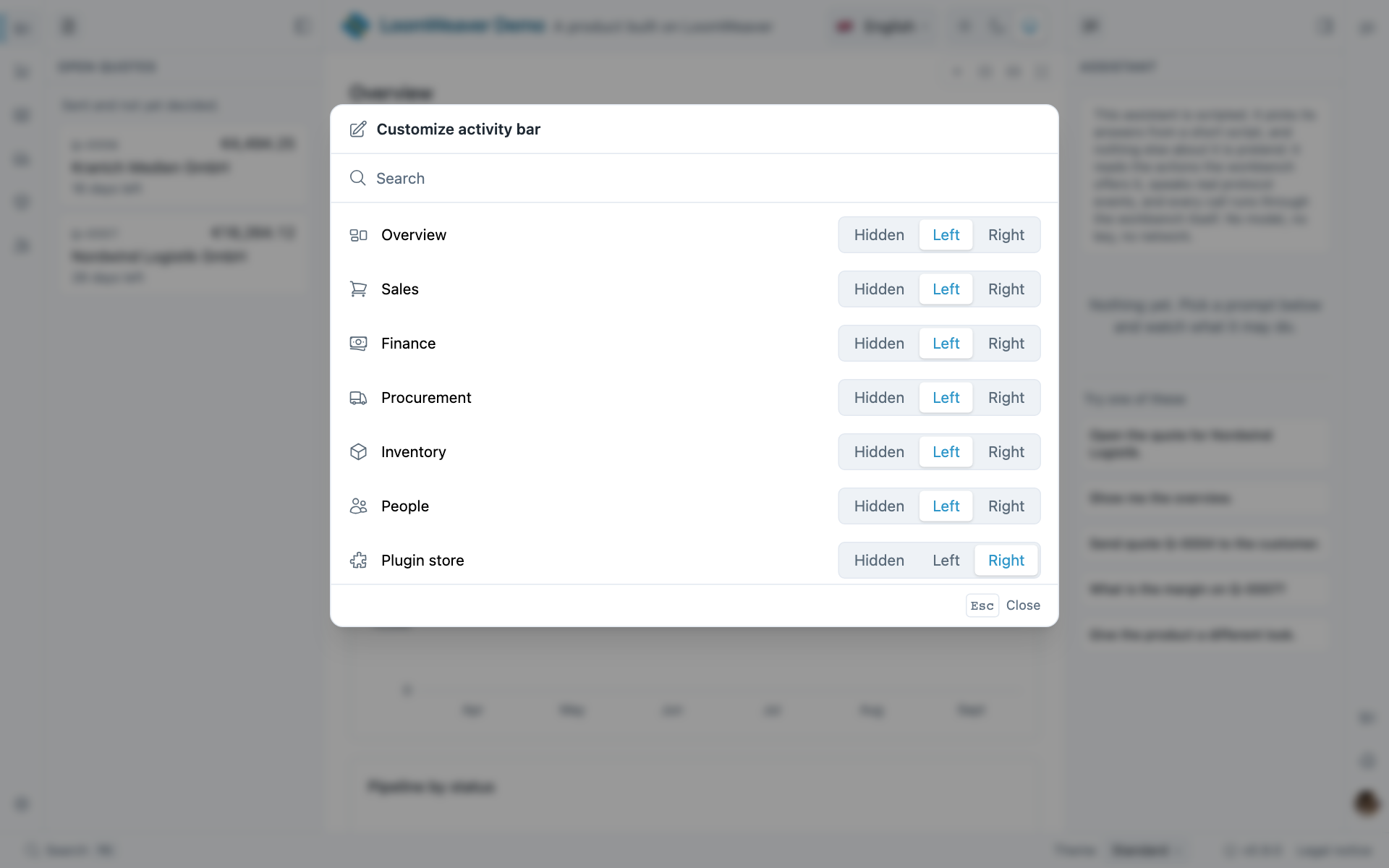
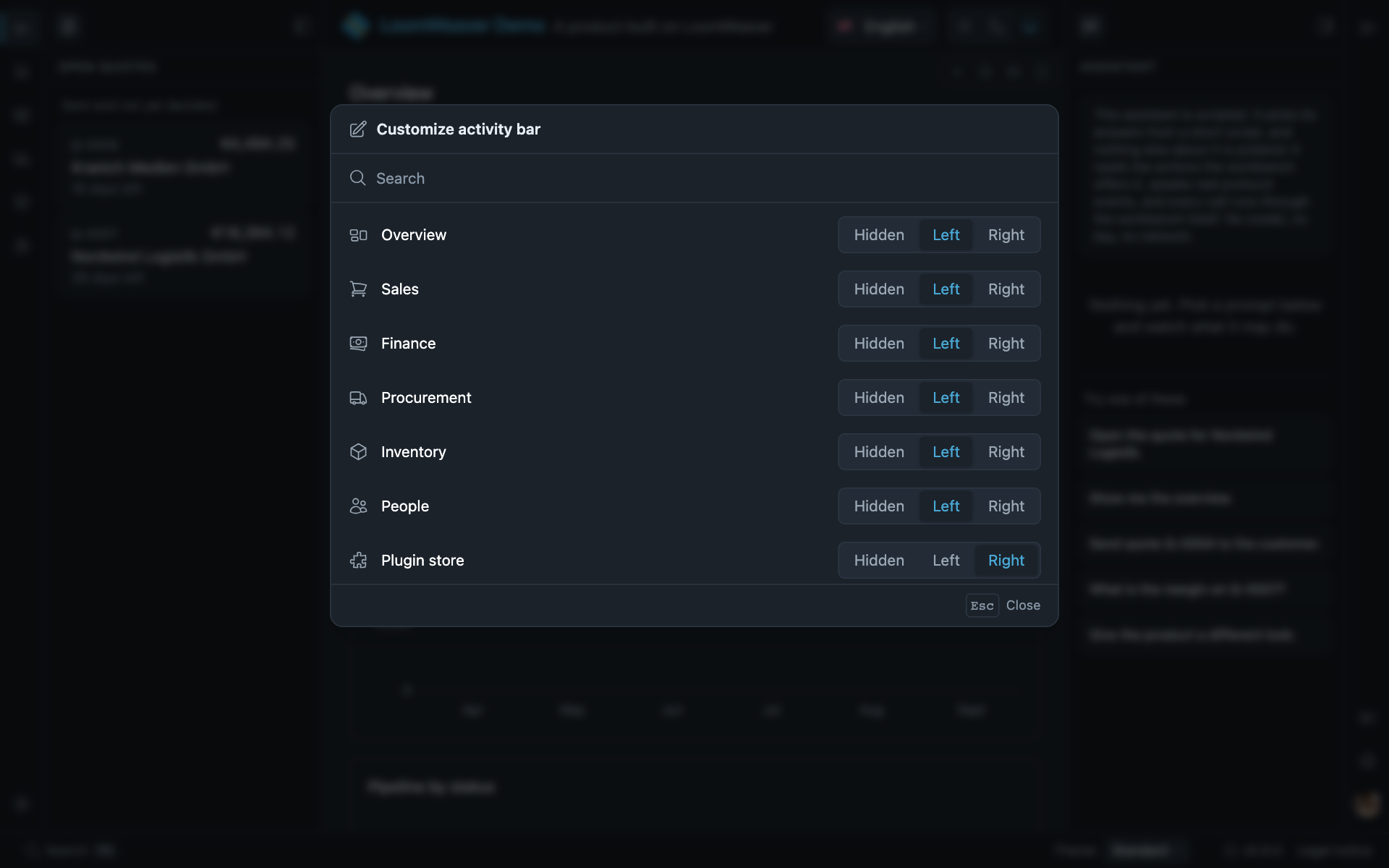
Customize activity bar in the demo, every entry with its side. The workbench’s menus say activity bar; these pages say rail.
The dialog is the command shell.rail.customize, with the same consequences: palette, shortcut, your
own trigger, or omit; the menu entry is menu:shell.rail.customize. Switching the capability off
(rail: { curate: false }) removes command, menu entry and right-click together.
The list holds two kinds. The entries your distribution and its plugins registered are shown in their declared rail until the user hides or moves one. The user’s own saved workspaces are hidden until the user puts one somewhere; that is all “pinning” is, and the entry then behaves like a declared one, marking itself while its workspace is active. Both the visibility and the placement are stored app-wide rather than per workspace, for the same reason the rail itself is.
rail is therefore where an entry starts, not where it is bound to stay, just as a surface’s home
dock is where a view starts before the user moves it to the other sidebar. Nothing changes for a user
who never moves anything.
Two consequences worth knowing. A hidden entry takes its affordance with it, including for something
like Settings or Sign out: nothing becomes unreachable, because the command palette still runs
every command and the same right-click brings the entry back, but a distribution cannot assume its
rail is intact. And an entry that declares its own context menu with menu keeps it, because the
host’s Hide is added to that menu rather than replacing it.
Telling saved workspaces apart
A workspace a user saved has no icon to declare, so the shell derives a two-letter badge from its name and draws it wherever a developer-defined workspace would draw its icon: the rail entry, the workspace dialog and the rail’s curation list.
The letters are the initials of the first two words, or for a single word its first and last letter: “Month End” reads ME, “Review” reads RW, “Reports” reads RS. First-and-last rather than the first two, because the first two collide far too often: Review, Reports, Rechnungen and Recherche all begin RE, so more than half of a realistic set of names would share one badge.
When two names would still land on the same badge, only the newer one steps aside, to first-and-second, first-and-third and so on: Kunden keeps KN and Konten becomes KO. So adding a workspace never renames anyone else’s badge, and two letters stay two letters unless a name runs out.
The badge is derived, not stored: a rename updates it by itself and there is nothing to migrate. Deleting a workspace may let a later one simplify back to a shorter form, which is the price of not storing it. Deletion is far rarer than creation, and the badge gets simpler rather than stranger.
Whether the user may put their own saved workspaces in the rail is yours to decide. They are
never there by themselves; the user places one from Customize activity bar, and
workspaces: { savedInRail: false } withdraws that offer, so the rail holds what your product put
there and nothing else. An entry a user had placed before you switched it off stops being drawn, and
their placement is kept rather than erased, so switching it back on restores what each of them had.
The rail still says where the user is: while a saved workspace is active, the entry of the
workspace it was saved from is marked, because no entry is then the saved workspace’s own.
Everything else about a saved workspace is untouched: saving, renaming, resetting and switching all
work, with the workspace dialog as the way to them. This says nothing about whether a user may
save workspaces, which is a different question and has no switch.
A saved workspace is a variant of the one it was saved from. The shell records which developer-defined workspace was active when the user saved, shows it under the name in the workspace dialog (“Variant of Quotes”), and lets the variant keep whatever content that workspace claims, so a user who built their own way of working with quotes is not thrown out of it the moment they open one.
The origin is read through rather than copied, so a claim you add later reaches every variant of that workspace. Saving from a variant produces another variant of the same declared workspace, so the relation is always one step deep. Saving from the built-in empty workspace leaves a variant without an origin, as does removing the workspace it came from: it then claims nothing, is listed without an origin line, and is otherwise unchanged. The origin cannot be moved afterwards; a user who wants their arrangement to belong elsewhere saves it again from there.
Your own rail items can do the same with initials on a RailItem, for entries the user named
(projects, accounts). The host draws the letters in place of the icon, in the app font and in the
colour the icon would have taken, so hover and the active marker behave as they do everywhere else;
icon stays required as the fallback.
A workspace that can no longer work as declared
A workspace’s stored arrangement is read against the declarations in force now, not the ones in force when it was written, and where the two disagree the workbench says so rather than rewriting what the user stored. Content stored at an address another workspace now claims is restored where it was, and the disagreement is reported to the console in dev mode. Nothing is dropped on the user’s behalf.
One disagreement reaches the user, because only the user can settle it: a workspace that declares content of its own and whose stored arrangement leaves it with none cannot show anything. Such a workspace is still entered, never exchanged for whichever workspace claims the starting address, and the workbench names the condition in the content area and offers the reset that repairs it.
A product that would rather answer that itself takes withoutUnusableWorkspaceNotice(), a
WorkspacesFeature passed among the declarations. It settles the question for the whole
composition rather than per workspace, and it silences only the message: the arrangement is still
restored untouched, the workspace is still entered, and which workspaces are affected stays readable,
so the product can draw its own notice or reset them on its own terms.
provideWorkspaces( { id: 'dashboard', title: 'product.workspace.dashboard', initial: true, claims: [''] }, { id: 'payments', title: 'product.workspace.payments', claims: ['payments'] }, withoutUnusableWorkspaceNotice(),),(ANNOUNCE_UNUSABLE_WORKSPACES is the token behind that feature; a distribution never injects it
itself.)
What the workbench recognised is readable through UNUSABLE_WORKSPACES, an injectable
UnusableWorkspaces whose ids() names the workspaces that cannot work as declared and whose
announced() says whether the workbench is speaking for the workspace the user is in. Reading it is
how a product that silenced the notice draws its own, or offers shell.workspace.reset with the
workspace named.
Where next
- Workspaces:
WorkspaceService, switching, saving and resetting from your own code. - Workspaces: what a workspace is, its baseline and its two origins.
- Resetting the arrangement: the two resets and what each puts back.